
TikTok API
Options for posting using the TikTok API
ACME offers direct publishing of TikTok videos, comment management, and retrieval of advanced analytics for either your personal or business TikTok account using the TikTok API.
TikTok asynchronously processes video and photos, so the JSON response will be status: "pending" for both immediate and scheduled posts. Once TikTok has completed processing, your registered Scheduled Action webhook will be called.
TikTok Video Post
JSON for a basic TikTok video post that is directly published:
{
  "post": "The best TikTok \n video ever #bestvideo", // Max 2,200 characters with a line break
  "mediaUrls": ["https://img.acme.com/012/tiktok.mp4"],
  "platforms": ["tiktok"]
}
Example JSON post response:
{
  "status": "success",
  "errors": [],
  "postIds": [
    {
      "status": "success",
      "idShare": "video.7088122496758679353.nzLqBWbf",
      "id": "pending",
      "isVideo": true,
      "platform": "tiktok"
    }
  ],
  "id": "lb42orDhySAZmLWtj6b6",
  "refId": "23a9da9e0df1184a7a6a1fc2c60b8023aa9a32a1",
  "post": "The best TikTok video ever #bestvideo"
}
TikTok does not currently support line breaks in the post text. Included line breaks will be ignored.
Either one video or up to 35 images may be published. TikTok does not support a combination of video and images. Please see below for more details.
If the video does not end in a known extension, use isVideo.
TikTok also supports sending media without post text. If you do not want post text included send an empty String
post: "".See TikTok Media Guidelines and TikTok Authorization for more information.
TikTok Video Requirements
- Please see TikTok Video Requirements.
The video must end in a known video extension such as mp4. Please either reverse proxy the URL, add on a vanity URL with a CDN, or use the /media endpoint.
- TikTok's post text character limit is 2,200.
TikTok limits the API video publishing to 6 videos per minute with an upper limit of 15 videos per day.
TikTok Image Post
JSON for a basic TikTok image (photo) post that is directly published:
{
  "post": "The best TikTok \n video ever #bestvideo", // Max 2,200 characters with a line break
  "mediaUrls": [
    "https://img.acme.com/012/gb.jpg",
    "https://img.acme.com/random/photo-1.jpg"
  ], // Up to 35 images
  "platforms": ["tiktok"]
}
Example JSON response:
{
  "status": "success",
  "errors": [],
  "postIds": [
    {
      "status": "success",
      "idShare": "p_pub_url~v2.7408974036430047275",
      "id": "pending",
      "isVideo": false,
      "platform": "tiktok"
    }
  ],
  "id": "8815mJ5bWApEebWjE233",
  "tikTokId": "p_pub_url~v2.7408974036430047333",
  "refId": "9abf1426d6ce9122ef11c72bd62e59807c5cc333",
  "post": "Opportunity is missed by most people because it is dressed in overalls and looks like work - Thomas Edison"
}
TikTok does not currently support line breaks in the post text. Included line breaks will be ignored.
- Either one video or up to 35 images may be published.
TikTok does not support a combination of video and images. Please see below for more details.
- The images must be of type JPG, JPEG, or WEBP. TikTok does not accept PNG media files.
You may also select one of the images as the cover photo with the
imageCoverIndex. By default, the first image is used. Please see below for details.
TikTok Image Requirements
- Please see TikTok Image Requirements.
- Up to 35 images may be included in a post, at 20 MB per image.
- The images must be of type JPG, JPEG, or WEBP. TikTok does not accept PNG media files.
- TikTok's post text character limit is 2,200.
TikTok limits the API video publishing to 6 photos per minute with an upper limit of 15 photos per day.
TikTok Processing
TikTok does asynchronous processing of videos and images, so the response will have the id field set to "pending".
After TikTok completes their processing, usually within 1 - 2 minutes, the id field will be updated with the TikTok video id and a postUrl will be added.
You can retrieve the final status of the TikTok post using webhooks or the /history endpoint and usually takes up to 1-2 minutes to be available.
When the user publishes the video in the TikTok mobile app, a "scheduled" webhook will be sent with the
subAction: "tikTokPublished".If an error occurs, such as TikTok was unable to process the video or ACME internal tests failed, the
idfield will be set to "failed" and theerrorsfield will contain the error details.- The
idShareis used for internal referencing the pending video.
TikTok Options
When publishing a TikTok video or images additional options are available.
Video Publishing Example:
{
  "tikTokOptions": {
    "disableComments": true, // Default false. Disable comments on the published video.
    "disableDuet": true, // Default false. Disable duets on the published video.
    "disableStitch": true // Default false. Disable stitches on the published video.
  }
}
Image Publishing Example:
{
  "tikTokOptions": {
    "imageCoverIndex": 1, // Use the second image in the mediaUrls.
    "title": "Amazing images"
  }
}
Options
The following options are available for TikTok posts.
They should be added to the tikTokOptions object.
Please see below for more details on each option.
{
  "post": "The best TikTok video ever #bestvideo",
  "mediaUrls": ["https://img.acme.com/012/tiktok.mp4"],
  "platforms": ["tiktok"],
  "tikTokOptions": {
    "autoAddMusic": true,
    "disableComments": true,
    "disableDuet": true,
    "disableStitch": true,
    "draft": true,
    "isAIGenerated": true,
    "isBrandedContent": true,
    "isBrandOrganic": true,
    "imageCoverIndex": 1,
    "title": "Amazing images",
    "thumbNailOffset": 30000,
    "visibility": "public"
  }
}autoAddMusicbooleandefault: falseWhether to automatically add recommended music to the post.
If you set this field to true, you can change the music later in the TikTok app.
Media type: image
disableCommentsbooleandefault: falseWhether to disable comments on the published post.
Media type: video, image
disableDuetbooleandefault: falseDisable duets on the published video.
Media type: video
disableStitchbooleandefault: falseDisable stitch on the published video.
Media type: video
draftbooleandefault: falseisAIGeneratedbooleandefault: falseWhether to enable the AI-generated content toggle for the video post.
If you enable the toggle, your video will be labeled as "Creator labeled as AI-generated" once posted and can't be changed. The "Creator labeled as AI-generated" label indicates that the content was completely AI-generated or significantly edited with AI.
Turning on the AI-generated content setting won't affect the distribution of your video as long as it doesn't violate TikTok's Community Guidelines.
Media type: video
isBrandedContentbooleandefault: falseWhether to enable the Branded Content toggle. If this field is set to true, the video will be labeled as Branded Content, indicating you are in a paid partnership with a brand. A "Paid partnership" label will be attached to the video.
Media type: video, image
isBrandOrganicbooleandefault: falseWhether to enable the Brand Organic Content toggle. If this field is set to true, the video will be labeled as Brand Organic Content, indicating you are promoting yourself or your own business. A "Promotional content" label will be attached to the video.
Media type: video, image
imageCoverIndexnumberdefault: 0The index of the mediaUrls to be used as the cover for the post.
Media type: image
titlestringThe title of the post.
Media type: image
thumbNailOffsetnumberThe frame to use for the video cover.
See video thumbnail options for more information.
Media type: video
visibilitystringdefault: publicHow the post is shared and who can see it.
Values: public, private, followers, or friends.
See visibility options for more information.
Media type: image
Visibility Options
| Visibility | Description |
|---|---|
| public | Visible to all TikTok users. |
| private | Private, only visible to the account itself. |
| followers | Only visible to followers of the account. |
| friends | Only visible to mutual followers. |
Private posts will remain in a status pending and no TikTok webhook will be sent until the post is made public.
Video Thumbnail
There are two ways to set a thumbnail, also known as a cover photo, for a TikTok video:
- Using the
thumbNailOffsetparameter to set a thumbnail frame. - Using the
thumbNailparameter to set a thumbnail image from a URL.
Only videos are supported for setting a thumbnail.
Thumbnail Offset
Set a thumbnail for a TikTok video by selecting an offset frame. TikTok does not support uploaded images for thumbnails.
{
  "tikTokOptions": {
    "thumbNailOffset": 30000 // milliseconds of offset image
  }
}
The offset is the location in milliseconds of the thumbnail frame. Default value is 0, which is the first frame of the video.
Thumbnail URL
Set a thumbnail for a TikTok video by uploading an image from a URL.
{
  "tikTokOptions": {
    "thumbNail": "https://img.acme.com/012/gb.jpg"
  }
}
If you use the thumbNail parameter, the thumbNailOffset parameter will be ignored.
Please see TikTok Thumbnail Requirements for more information.
TikTok Mentions
Mention another TikTok handle by adding @handle in the post text. For example:
{
  "post": "Love the @acme social media api"
}
Please review the important rules on mentions.
TikTok Draft Post
Create a draft post for a TikTok video or image, allowing you to edit the video or image before publishing.
{
  "post": "The best TikTok video ever #bestvideo", // empty string is allowed
  "mediaUrls": ["https://img.acme.com/012/tiktok.mp4"],
  "platforms": ["tiktok"],
  "tikTokOptions": {
    "draft": true
  }
}
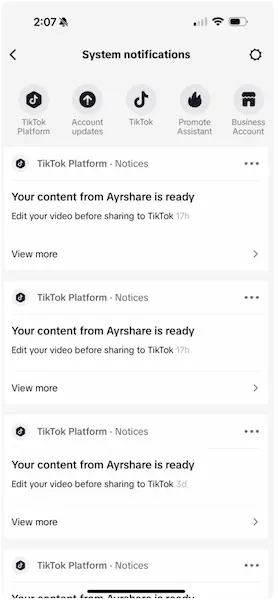
The draft video or image post will be found under the notifications Inbox in bottom row of the TikTok app. Look for a System notifications message and then click the top Your content from ACME is ready message.
The ACME postUrl will remain in pending status until the video is published. First comment not supported on draft posts.
Authorization Refresh
TikTok must be reauthorized every year via the Social Accounts page.
An email and webhook social action notification will be sent 15 days in advance of authorization expiration.
The refresh required date and remaining days can be retrieved from the /user endpoint.
Character Limits
Please see TikTok Character Limits for more information.
Additional Information
Additional examples on using the TikTok API.