
X API
Options for posting using the X API
Posting to X (Twitter)
JSON for a basic post with a link and image using the X API, fomerly known as the Twitter API:
{
  "post": "The best Tweet ever #best https://www.twitter.com", // empty string is allowed
  "mediaUrls": ["https://img.acme.com/012/gb.jpg"],
  "platforms": ["twitter"]
}
X will automatically preview the link in the Tweet unless there is an image or video included. In the above example the image will show. Removing the image will cause the link preview to show.
If your video doesn't end in a known video extension such as mp4, please use the
isVideoparameter. See the /post endpoint for details.X also supports sending media without post text. If you do not want post text included send an empty String
post: "".You may upload up to 4 images or videos in a single Tweet. Please see the important guidelines and restrictions posting Twitter videos.
See X Media Guidelines and X Authorization for more information.
X Options
You can set additional options for a post by using the twitterOptions parameter.
{
  "twitterOptions": {
    "altText": ["This is my best pic", "😃 here is the next one"],
    "blockCountries": ["US", "CA"], // or "allowCountries": ["GB", "IE"]
    "longPost": true,
    "longVideo": true,
    "poll": {
      "duration": 5, // required. Number in minutes
      "options": ["yes", "maybe", "no"] // required
    },
    "quoteTweetId": "651601430669664256",
    "replySettings": "mentioned",
    "subscribersOnly": true,

    // Subtitles / Captions for Videos
    "subTitleUrl": "https://img.acme.com/012/captions.srt",
    "subTitleLanguage": "en",
    "subTitleName": "English"

    // Thread Options
    "thread": true,
    "threadNumber": true,
    "mediaUrls": ["https://img.acme.com/012/gb.jpg"],
  }
}
X options are optional fields that can be used to control the post.
altTextarray of stringsAlternative text for images to help with accessibility and screen readers. Maximum 1,000 characters per alt text.
See Alt Text for more information.
blockCountriesarray of stringsRestrict media to specific countries by blocking certain regions. Use country codes.
Cannot be used with allowCountries. See Geo Restrictions for more information.
allowCountriesarray of stringsRestrict media to specific countries by allowing certain regions. Use country codes.
Cannot be used with blockCountries. See Geo Restrictions for more information.
longPostbooleandefault: falseEnable posting of longer posts up to 25,000 characters for Premium users.
See Long Post for more information.
longVideobooleandefault: falseAllow posting videos longer than 2 minutes 20 seconds for approved accounts.
See Long Video for more information.
pollobjectConduct polls with custom options and duration.
Required fields: duration (number in minutes), options (array of strings).
See Polls for more information.
quoteTweetIdstringQuote another tweet by specifying the Tweet ID.
See Quote Tweet for more information.
replySettingsstringControl who can reply to the post.
Values: following, mentioned, subscribers, or verified.
See Reply Settings for more information.
subscribersOnlybooleandefault: falseMake the post visible only to subscribers.
See Subscribers Only for more information.
subTitleUrlstringAdd subtitles/captions to videos using SRT files. Must be a valid SRT file URL ending in .srt.
See Subtitles / Captions for Videos for more information.
subTitleLanguagestringdefault: enThe language of the subtitles. Must be a valid language code.
subTitleNamestringThe name of the caption track. Maximum 150 characters.
threadbooleandefault: falseBreak long posts into connected thread series with optional numbering and media.
See Threads for more information.
threadNumberbooleandefault: falseAutomatically add numbers at the end of threads in the format of 1/n.
Requires thread: true.
mediaUrlsarray of stringsAdd media objects to threads. One media object will be added to each thread in order.
Use null to skip media for a specific thread. Use objects with multiple URLs for multiple media per thread.
Alt Text
Add alternative text, also known as alt text, to a Tweet's image. X alt text is an accessibility feature used for additional user info and screen readers.
Use the altText in the twitterOptions object.
{
  "twitterOptions": {
    "altText": ["This is my best pic", "😃 here is the next one"] // Array of Alt Texts
  }
}
Each alt text must correspond to an image in the mediaUrls array. The alt text will be applied to each image in order.
Alt text cannot be applied to videos. If a video is included in the mediaUrls with altText,
the video will not be posted. Alt text must be 1,000 characters or less.
Geo Restrictions
You can restrict X media, such as an image or video, to a specific countries by using the blockCountries and allowCountries parameters with country codes.
The post will still show in all countries, but the media will not be available in the countries specified.
{
  "twitterOptions": {
    "blockCountries": ["US", "CA"]
  }
}{
"twitterOptions": {
"allowCountries": ["GB", "IE"]
}
}blockCountries: An array of country codes to block. See country codes.allowCountries: An array of country codes to allow. See country codes.
You must only use one of the parameters blockCountries or allowCountries at a time.
If both parameters are used or a country is not supported by X, the geo restrictions will be ignored.
Long Post
Users with Premium X accounts, such as Premium or Premium Plus, have the ability to post longer posts of up to 25,000 characters. ACME automatically allows long from posts for users with Premium X accounts.
If the user changes their X Premium status, please wait 24 hours for it to reflect in ACME. You can check the Premium subscription status of a user with the /user or /analytics endpoints.
You may also force a long form post to be accepted with the longPost body parameter. This can be done by including the following JSON in your request:
{
  "twitterOptions": {
    "longPost": true
  }
}
However, if a user without a Premium account attempts to post a long tweet, the system will return a code: 111 error.
Long Video
Business or Enterprise Plan required.
X requires videos have a maximum video length of 2 minutes and 20 seconds. However, if you have been approved by X to upload longer videos, such if ther user's X account is Premium account or in the Amplify Partner Program, you can post videos up to 10+ minutes in length.
Please verify that your user's X account is Premium or in the Amplify Partner
Program
before using the longVideo parameter. If your user's X account is not authorized to post long
videos, the system will return an error.
Use the longVideo twitterOptions parameter when posting a long video:
{
  "twitterOptions": {
    "longVideo": true
  }
}
Mentions
Mention another X handle by adding @handle in the post text. For example:
{
  "post": "The best social media API @ACME ever!",
  "platforms": ["twitter"]
}
Please review the important rules on mentions.
Polls
Conduct an X Poll with the twitterOptions poll parameter.
{
  "twitterOptions": {
    "poll": {
      "duration": 5, // required. Number in minutes
      "options": ["yes", "maybe", "no"] // required
    }
  }
}duration: A number of minutes specifying the duration the poll will be conducted.options: An array of strings of the poll options.
Quote Tweet
You can quote another Tweet by specifying the low-level Tweet ID. The ID can be retrieved via the /post response in the postIds field, get history, or directly from the Tweet URL: https://twitter.com/ACME/status/1651601430669664256
{
  "twitterOptions": {
    "quoteTweetId": "651601430669664256" // low-level Tweet Id
  }
}
Reply Settings
You can set the reply settings for a post to only allow replies by certian types of users.
{
  "twitterOptions": {
    "replySettings": "mentioned"
  }
}
The replySettings parameter can be one of the following values:
following: Only users who the X account is following can reply.mentioned: Only users who are mentioned in the post can reply.subscribers: Only users who are subscribers to the X account who posted the post can reply.verified: Only users who are verified on X can reply to the post.
Subscribers Only
You can set a post to only be visible to subscribers by using the subscribersOnly parameter.
{
  "twitterOptions": {
    "subscribersOnly": true
  }
}
Subtitles / Captions for Videos
You can add X subtitles, also known as X captions, to videos by including an SRT file. Use the subTitleUrl field in the twitterOptions object to specify the URL to your SRT file.
{
  "twitterOptions": {
    "subTitleUrl": "https://img.acme.com/012/captions.srt",
    "subTitleLanguage": "en",
    "subTitleName": "English"
  }
}subTitleUrl: A valid SRT file. The URL must start withhttps://and end in.srtand be a valid SRT file.subTitleLanguage: Optional: The language of the subtitles. Must be a valid language code. Default: "en".subTitleName: Optional: The name of the caption track. The name is intended to be visible to the user as an option during playback. The maximum name length supported is 150 characters. Default: "English".
Thread
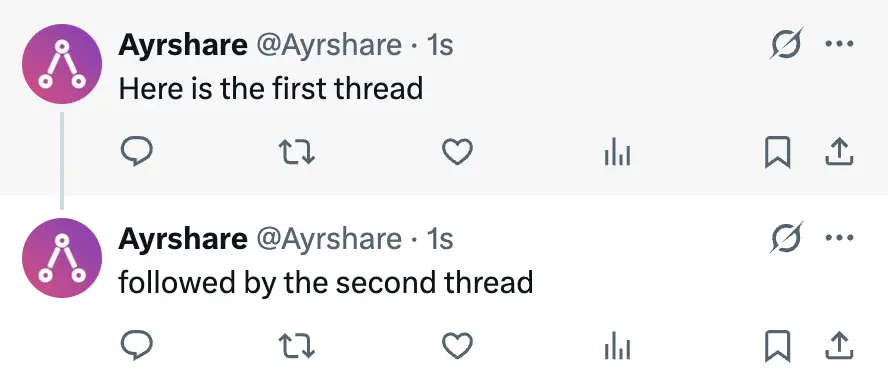
An X Thread, also known as a tweetstorm, is a connected series of posts on X (formerly Twitter) that allows you to share longer ideas beyond a single post's character limit, appearing as one continuous narrative when viewed together.
Posting a Thread
A X Thread can be posted via the API. A thread is a post broken up into a set of reply threads and associated in X with a line. You cna either automatically break up the post or specify the thread breaks in the post text.
{
    "twitterOptions": {
        "thread": true,        // required for TweetStorm
        "threadNumber": true,  // optional to add numbers to each thread
        "mediaUrls": ["https://site.com/image1.png", "https://site.com/image2.png", ...]  // optional one media object is added to a thread in order
    }
}
thread: trueto automatically break apart the post text into threads based on line breaks.threadNumber: trueto automatically add numbers at the end of threads in the format of 1/n. For example the 2nd of 5 threads will have appended: 2/5mediaUrls: [array of urls]to add each media object, an image or video, to a thread in order. Only one media object will be added to a thread in order.
If the post is sent as a X Thread, the returned post analytics will be an array of Tweets, "twitter": []. See Post Analytics 200 Response for more information.
Thread Media
Skip Media
Skip media for the thread by using null in the array. For example:
["https://site.com/image1.png", null, "https://site.com/image2.png"]
This will place image1 on the first Tweet, no image on the second Tweet, and image2 on the third Tweet.
Multiple Media
Multiple media objects can be added to a Tweet in a Thread by adding an object {} with the media URLs in the mediaUrls array. Any unique object keys can be used. For example:
{
  "twitterOptions": {
    "thread": true,
    "threadNumber": true,
    "mediaUrls": [
      "https://img.acme.com/random/photo-1.jpg",
      {
        "1": "https://img.acme.com/random/photo-2.jpg",
        "2": "https://img.acme.com/random/photo-3.jpg"
      },
      "https://img.acme.com/random/photo-4.jpg"
    ]
  }
}
In this example, the first Tweet will contain photo-1.jpg, the second Tweet photo-2.jpg and photo-3.jpg, and the third Tweet photo-4.jpg.
Thread Breaks
ACME automatically breaks up the post text into appropriate length tweet (> 280 characters). When creating threads, we prioritize keeping complete sentences in one post when possible. If a sentence won't fit, we split between sentences. For very long sentences, we split between words. In rare cases where a word is too long, we split the word itself.
You may also manually add paragraphs with \n\n to the post text to indicate a unique thread should be created.
If you have \n\n in the post text, we will not automatically break the post into threads.
For example:
{
  "post": "This is tweet 1\n\nThis is tweet 2.",
  "platforms": ["twitter"],
  "twitterOptions": {
    "thread": true
  }
}
will result in two Tweets in the thread.
If you want to add paragraphs, but not break into Tweets, use \u2063\n\u2063\n
{
  "post": "This is paragraph 1\u2063\n\u2063\nThis is paragraph 2.",
  "platforms": ["twitter"],
  "twitterOptions": {
    "thread": true
  }
}
will result in one Tweet with two paragraphs since the post is below 280 characters.
Delete a Thread
To delete a Tweet Storm, call the /post delete endpoint with the top level post ID returned in the response. All threads will be deleted.
Character Limits
Please see X/Twitter Character Limits for more information.
X Video Compatibility
Some video software creates MP4 files that are not compatible with X. For example, Camtasia versions older than 2019.0.9 create MP4 files that X rejects. Also more than one audio track often causes problems.
If you receive back the following message while posting, it indicates the video is not compatible with Twitter and needs to be re-encoded.
"file is currently unsupported"
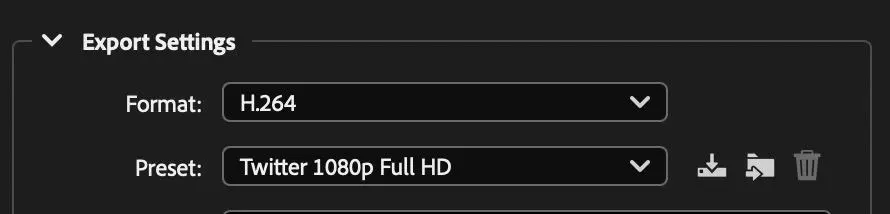
Please check your video software for compatibility. For example, Adobe Media Encoder has an export preset for Twitter 1080p Full HD.
Please see here for more X API examples.
Subscribers Only
You can set a post to only be visible to subscribers by using the subscribersOnly parameter.
{
  "twitterOptions": {
    "subscribersOnly": true
  }
}
Reply Settings
You can set the reply settings for a post to only allow replies by certian types of users.
{
  "twitterOptions": {
    "replySettings": "mentioned"
  }
}
The replySettings parameter can be one of the following values:
following: Only users who the X account is following can reply.mentioned: Only users who are mentioned in the post can reply.subscribers: Only users who are subscribers to the X account who posted the post can reply.verified: Only users who are verified on X can reply to the post.